Arnis on your phone, tablet or Chromebook
There is no Arnis APK. The official way on mobile is MapSmith in the browser.
There is no Arnis app for Android or iOS, and there is no Arnis APK. The Arnis desktop app runs on Windows, macOS and Linux, and on many Chromebooks through Linux. On a phone or tablet you use MapSmith, the official online generator, in your browser. It builds the world on a server and gives you a Bedrock .mcworld file that Minecraft imports.
Is there an Arnis APK?
No. I do not publish Arnis as an Android app, an iOS app or an APK file. An APK or a store app that uses the Arnis name does not come from the project, and I cannot vouch for what is inside it. Please do not install it.
Arnis has three official places and no others:
- arnismc.com, this website
- github.com/louis-e/arnis, the source code and the desktop releases
- MapSmith at arnismc.com/mapsmith/, the online generator
As of November 2026, several unrelated websites use the Arnis name. None of them is run by the project. The page about official Arnis, MapSmith and unofficial sites shows how to tell them apart.
How to get a real place into Minecraft on your phone
I make MapSmith myself, and it runs the same engine as the desktop app on a server. Your phone needs a browser and Minecraft Bedrock Edition 1.21.0 or newer. You do not need an account. The world is built from OpenStreetMap data (© OpenStreetMap contributors) and real elevation data.
- Open MapSmith in the browser on your phone or tablet.
- Type a city, an address or a landmark into the search field.
- Tap a preset to place an area, or draw your own rectangle. The smallest area is 0.2 km².
- Tap the map inside the area to set the spawn point. That is where you stand when the world opens.
- Leave the format on Bedrock. On a phone MapSmith selects it for you.
- Pay by card, Apple Pay or Google Pay. Depending on your country, PayPal, Pix, UPI and other methods are offered too.
- Wait for the world. Most worlds are ready within a few minutes. The download link appears on the status page and is sent to your email address. It stays valid for 7 days.
- Open the downloaded
.mcworldfile. Minecraft starts and imports the world.
If the file does not open in Minecraft, the guide on how to import a Minecraft world has the steps for Android, iPhone and iPad.
The MapSmith interface is available in English, German, Spanish, French, Italian, Portuguese, Polish, Czech, Turkish, Russian and Japanese.
What does a world from MapSmith cost?
The price depends only on the size of the area. It starts at €3 and rises smoothly between the points in this table. Prices are in euros with tax included, and the checkout shows your local currency. There is no subscription.
| Area | Price | Editions |
|---|---|---|
| up to 0.2 km² | €3 | Bedrock and Java |
| 3.1 km² | €5 | Bedrock and Java |
| 22 km² | €10 | Bedrock and Java |
| 100 km² | €15 | Bedrock and Java |
| 250 km² | €25 | Bedrock and Java |
| 500 km² | about €37.50 | Java only |
| 750 km² (maximum) | €50 | Java only |
Bedrock worlds go up to 250 km², so a world for a phone costs €25 at most.
You can get a refund within 14 days without giving a reason. Write to mapsmith@arnismc.com. If a world is not delivered within 24 hours, you get a full refund.
Free option: generate on a computer, play on the phone
The Arnis desktop app is free and open source. If you can use a Windows, macOS or Linux computer, generate the world there and move the file to your phone.
- Download Arnis from the GitHub releases page:
arnis-windows.exe,arnis-mac-universal.tar.gzorarnis-linux.tar.gz. - Find the place on the map, pick the Select area tool and drag a rectangle over it.
- Choose Bedrock as the format, then click Start Generation.
- Arnis saves a
.mcworldfile to your Desktop. You can change the folder under Settings > Application > Bedrock Save Path. - Move the file to your phone with cloud storage, by email or over a USB cable.
- Open the file on the phone. Minecraft imports it.
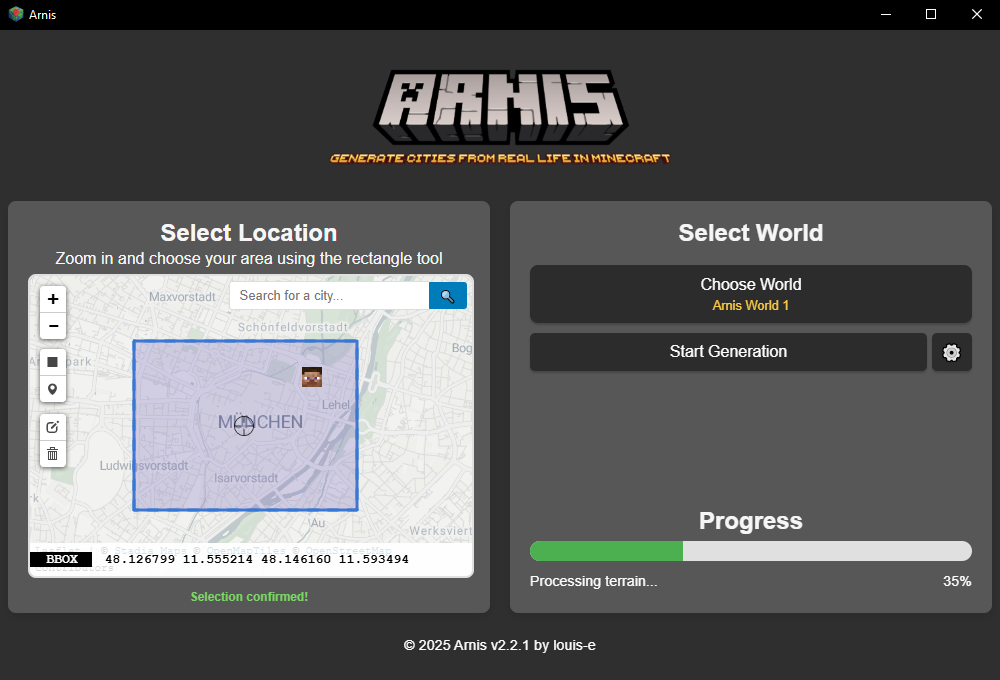
How to use Arnis covers the desktop app step by step. If Windows or macOS shows a warning on the first start, the page on whether Arnis is safe explains where it comes from.
Chromebook: the Linux version or MapSmith
A Chromebook with an Intel or AMD processor can run the Linux version of Arnis. Turn on the Linux development environment under Settings > About ChromeOS > Developers, download arnis-linux-appimage.tar.gz from the releases page, move it to your Linux files, extract it and start the AppImage. Chromebooks with an ARM processor cannot run it, because the Linux build is for x86_64 only, and school Chromebooks often have Linux turned off.
Every Chromebook can use MapSmith, because it only needs a browser. Minecraft for Chromebook is Bedrock Edition, so choose Bedrock in either one. You get a .mcworld file, which you open from the Files app.
Xbox, PlayStation and Switch: not officially supported
Consoles are not officially supported. They cannot open a .mcworld file directly. The workaround is a Realm: import the world on a phone or PC that is signed in to the same Microsoft account as the console, upload it to a Realm, then open the Realm on the console. The guide on importing a world on Java, Bedrock and consoles has the details.
How big a world can my phone handle?
My advice: keep the first world small. Pick the Neighborhood preset (0.2 km², €3) or the District preset (3.1 km², €5). One block is one meter, so even the Neighborhood size is a square of about 450 by 450 blocks.
Large worlds load slowly on phones. The first time you enter one, Minecraft has to load and light many chunks, and that takes a while. Lowering the render distance in Minecraft helps.
MapSmith does not stop you from going bigger: a Bedrock order can be as large as 250 km². But if the small world runs well on your device first, a larger one is a safer purchase.
Generate a world for your phone
MapSmith runs in the browser and delivers a Bedrock .mcworld file. The desktop app is free if you have a computer.
Generate it online with MapSmith Download Arnis (desktop)