Google Maps to Minecraft: what actually works
What you can take over from Google Maps, and the steps that get the same place into your game.
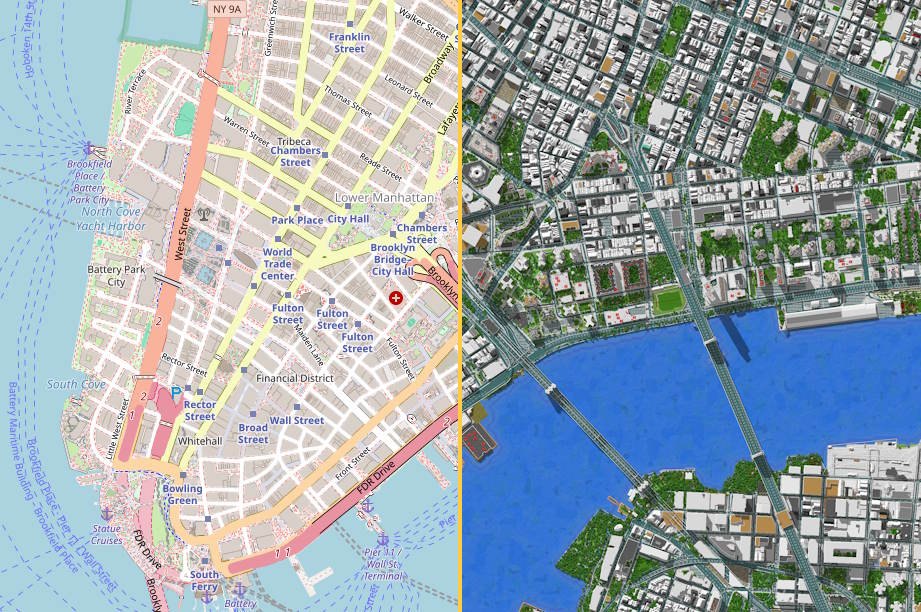
You cannot import Google Maps itself into Minecraft. You can get the same place into Minecraft from open map data: OpenStreetMap for buildings and roads, plus open elevation data for the terrain. That is what Arnis does, as a free desktop app and as the paid online generator MapSmith.
The picture shows Lower Manhattan, with the OpenStreetMap map on the left and the Arnis world on the right. The world is built from map data © OpenStreetMap contributors.
Can you convert Google Maps or Google Earth into Minecraft?
No. Arnis cannot convert Google Maps or Google Earth into a Minecraft world, and I cannot add that, because Google does not license its map data for this. Arnis builds the same place from OpenStreetMap, a free map of the world that anyone can edit, together with open elevation data.
For a single street or a whole city, this is what ends up in the world:
- Buildings with their real footprints. Heights come from OpenStreetMap tags, and from Overture Maps where OpenStreetMap has none.
- Roads with markings, stop lines and zebra crossings, plus bridges and railways.
- Terrain at its real elevation, with rivers, lakes and the coastline.
- Trees placed from a global canopy-height map, at about their real height.
- Landmarks as 3D models where one exists, for example the Eiffel Tower or the Statue of Liberty.
What you do not get is the photo look of Google Earth. The world is made of normal Minecraft blocks, and satellite photos never end up in it.
Arnis converts map and elevation data into blocks with fixed rules. No AI is involved, so the same area gives the same world every time.
How to do it
Look the place up in Google Maps first if that is where you know it from. Then find the same place in MapSmith or in the Arnis desktop app. MapSmith runs in the browser and costs from €3. The desktop app is free and runs on your own computer.
Online with MapSmith
- Open MapSmith. You do not need an account.
- Type a city, an address or a landmark into the search field, or move the map to the place.
- Pick a preset or draw a rectangle around the area, then set the spawn point.
- Choose Java or Bedrock and the options you want.
- Pay. The price depends only on the area: €3 for up to 0.2 km², €5 for 3.1 km², €10 for 22 km².
- The world is generated on the server. You get the download link by email and on the status page, in most cases within a few minutes.
A link can open MapSmith directly on a place. This one starts at the Eiffel Tower: open the Eiffel Tower in MapSmith.
Free with the desktop app
- Download Arnis for Windows, macOS or Linux and start it.
- Search for the city with the search field, or move the map to the place.
- Pick the Select area tool and drag a rectangle over the area. Since version 3.5 you can also draw any shape.
- Pick Java or Bedrock.
- Click Start Generation. A small neighborhood takes seconds, a city center takes minutes.
Java worlds are saved into your Minecraft saves folder as "Arnis World 1", "Arnis World 2" and so on. Bedrock worlds are written as a .mcworld file, to the Desktop by default. How to use Arnis covers the first start and the settings.
What about copying coordinates from Google Maps?
Coordinates from Google Maps work. Right-click a spot in Google Maps and it shows the latitude and longitude of that spot, for example 48.8584, 2.2945 for the Eiffel Tower. There are three places to use them:
- MapSmith search: the search field takes a place name or an address, so typing the name is often quicker than the numbers.
- MapSmith link: put the numbers into a link of this form:
https://arnismc.com/mapsmith/?.lat=48.8584& lng=2.2945& z=15 latandlngare decimal degrees, andzis the zoom level from 3 to 18. - Desktop app: the command line takes a bounding box as
--bbox min_lat,. The Bounding Box field in the settings (gear button, under Map & Input) takes the same four numbers.min_lng, max_lat, max_lng
A bounding box needs two corners: first the south-west corner of your area, then the north-east corner. Right-click both corners in Google Maps to get them. This command builds a little over one square kilometer around the Eiffel Tower as a Java world:
arnis-windows.exe --bbox="48.853,
All other flags are listed on the Command Line Usage page of the wiki.
How accurate is the result?
The default scale is 1 block = 1 meter, so a building that is 20 meters wide is 20 blocks wide. How much detail you get depends on how well the place is mapped on OpenStreetMap.
Everything man-made comes from OpenStreetMap, with extra building footprints and heights from Overture Maps. The terrain comes from Mapterhorn elevation data, which combines the Copernicus GLO-30 model with national LiDAR surveys, in places down to 1 m. Land cover comes from ESA WorldCover at 10 m, and tree positions from a canopy-height map by Meta and the World Resources Institute at about 1 m. Real-world terrain in Minecraft has more on the elevation side.
If a building is missing in OpenStreetMap and in Overture Maps, it cannot be generated. You can check a place in one minute before you generate, and you can add what is missing yourself: see why buildings are missing and how to fix the map data.
Java, Bedrock, phone or console
Both routes make worlds for Java Edition 1.21.4 or newer and for Bedrock Edition 1.21.0 or newer. A Bedrock world is a single .mcworld file that Minecraft imports when you open it on Windows, Android, iPhone or iPad. The guide to real-world maps for Bedrock Edition has the details.
There is no Arnis app for Android or iOS, so on a phone or tablet the route is MapSmith in the browser, as described in Arnis on a phone, tablet or Chromebook. Consoles are not officially supported: Xbox, PlayStation and Switch cannot open world files directly. The workaround is a Realm, and how to import a Minecraft world explains the steps.
Ways to get a real place into Minecraft
MapSmith and the desktop app are both made by me and run the same engine. The table also lists building by hand, for comparison.
| Way | Cost | Where it runs | Editions | Time |
|---|---|---|---|---|
| Arnis desktop app | Free, open source | Your own computer (Windows, macOS, Linux) | Java and Bedrock, plus Luanti and Hytale (both experimental) | Seconds for a small neighborhood, minutes for a city center |
| MapSmith | From €3, by area | In the browser, on any device | Java up to 750 km², Bedrock up to 250 km² | Most worlds are ready within a few minutes |
| Building it by hand | Free | Inside the game | Any edition | Weeks |
On the desktop app, large areas need memory. At the default scale that is about 4 GB of RAM for areas over 100 km² and about 13 GB for areas over 500 km². MapSmith prices rise smoothly with the area, up to €50 for the 750 km² maximum.
For other projects that bring real places into Minecraft, see how Arnis compares with other tools.
Build your place in Minecraft
Select the area on the map and get it as a Java or Bedrock world.
Generate it online with MapSmith Download Arnis (desktop, free)